*OFFICIAL THREAD: Nokia 6650 (RM-324 6650d-1bH) NAM 3G 850/1900

I see what you're saying but I find it more important to be able to find the major buttons without having to look at the phone. I'm perfectly happy with what they put on the TMo version. What annoys me is AT&T modifying just about every phone to push specific services.

How hard is it to feel your way to the buttons at the top part of the phone, especially call and end?
 
Really.. Gotta test the phone to believe it..


Data Plan Subscription?? What Data Plan? SmartPhone or Media Net?

Don't tell me AT&T had finally realize that S60 is a smartphone OS?
 
I saw one in the store and it looked pretty sweet -- i saw it had a "SIP configuration" setting so two questions: can you follow those new "re-enable S60 native voip" instructions that are floating around with this phone and if you CAN get VoIP working is UMTS fast enough or do you need HSDPA (and the consensus is now that this phone is only UMTS and not HSDPA?)

i think i saw a post somewhere that said a guy was running Fring on it-- be interested to see how that worked.....

and to the guys getting N79s-- i think you'll be very happy with that phone. I got to play with one when i was in greece and it's a sweet phone. I had a N78 which i couldn't stand and this one seems to be far better! i might have to hold off for one of them instead :2thumbs:
 
I have had this happen recently. I can reproduce it consistently by having 2 calendar appointments display in the same week. Oddly enough, to-do items in the calendar don't seem to trigger it.

I was just starting to get into using the calendar functions when I discovered this. I'm pretty disappointed.
 
I am not sure if the softkey scan code question has been already answered before, but here are the codes:

The scan code for the center softkey is 182 (named 'Play' in MagicKey), the code for the left softkey is 185 (Rewind).

You only need to disable the central softkey, as soon as it's disabled left and right ones can do no harm any more.

After I disabled the central softkey, I was able to disable auto key lock, enable external display sleep and use the remaining softkeys to wake up (light up) the external display.
 
i just installed fring and was able to successfully do the test call. i'll have to try and add my gizmo account and see if that works, but i see no reason why it shouldn't since the Test Call worked fine.

fring never worked very good on my N78, so i was hesitant to use it, but now that i see the ports are all open i'm going to try and get a native client or gizmo or truphone to work on this thing.... but at least i've got some VoIP going.
 
Dude why wouldn't you want this phone? The N75 crippled tethering and was much more locked down than this phone. This phone seems to be far better with real 3G speeds, and enough RAM in practical use as any reasonable person would need. I had an N75 and this phone looks like a real winner. You lose FM radio but if you really need it and I doubt you do there are headset options to compensate but apart from that it seems like this is far better than the N75 was. I had one unbranded and my friend had one branded so I know a little about that phone.

Yes the N75 keypad was great, but it was also a little fat and ugly, this thing is on another level in those terms.
 
Yes. I've disabled or remapped the PTT, GPS, MEdia Net, and Camera keys. In case you haven't already seen MagicKey's instructions (not mine)...

For the GPS key - once you get MagicKey installed, start the app (it'll be in the Games & Apps menu). Click the right joystick button to move to the Keymap List page. Click the center button to select Default Keymap. Click again to Add Key Pair. When the screen comes up with Original Key and Maps To, press the green Send button on your phone and then press the GPS button (or just enter 226). Arrow down to the Maps To field and either hit the green send button and the down arrow or enter 17 to map the GPS button to the down arrow. Press the left select (OK) then the right select (Back) and the right select again (Exit).

Through a similar process you can map the PTT button (key code 181) to 0 to disable it, or map it to any other key.

To see a full list of possible codes, press the center key in either the Original Key or Maps To fields.

That's it - you're done.

One caveat about MagicKey is that it will not start automatically if you reboot the phone. Although there is an option to "start on boot," it does not work on this phone. That's where an app called PowerBoot comes in. It will let you autostart the KeyMapDaemon that is needed for MagicKey to start working on boot.

 
I can't address the other questions but there is a review out there on the web from Britain that has video taken with the 6650 in the review. I found it by Googling "6650 Review".
 
I'm not sure, because I haven't used either in the past.
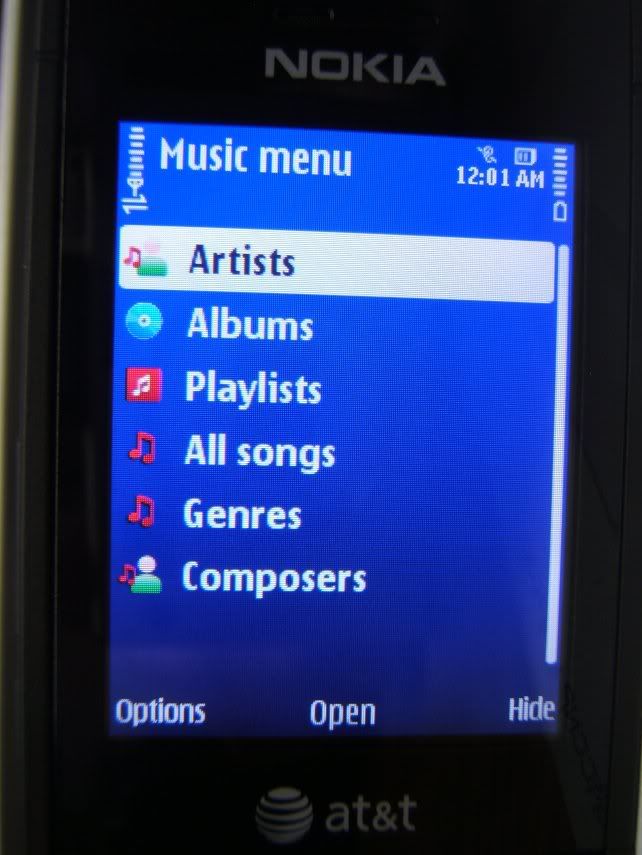
The menu lists it as AT&T Music then "Music Player", so I'm guessing it's something from AT&T. But I'm not sure.
Here is a pic of the music player just to be safe.

Dscf2412Resized.jpg


Glad to be of service,

Jon
 
It's just a requirement in my market, I know for a fact not everyone does this, but to qualify for the rebate you have to have either a data plan, messaging plan, or a mix of any feature that adds up to $15.

However, the "proper" data plan is the $15 MediaNet. I don't think they treat it as a smartphone OS, all the custom apps are Java like on the dumbphone.

I re-edited my post to give a better preview of the phone, I don't see any locks on it, but I could be missing something.
 
need your help please... i gotta 6650 n i turned it off the other day n went to power it back on but nothing happens.... what could be my prob?? i plugged it into the wall charger n still get nothing.. Thanks
 
@emo_andy No way to do it with the AT&T firmware. They took away Network mode and Operator Selection from Settings > Phone > Network

@s85b50 the 6650 supports HSDPA... i remember seeing 3.5G when I send data.
 
Back
Top