
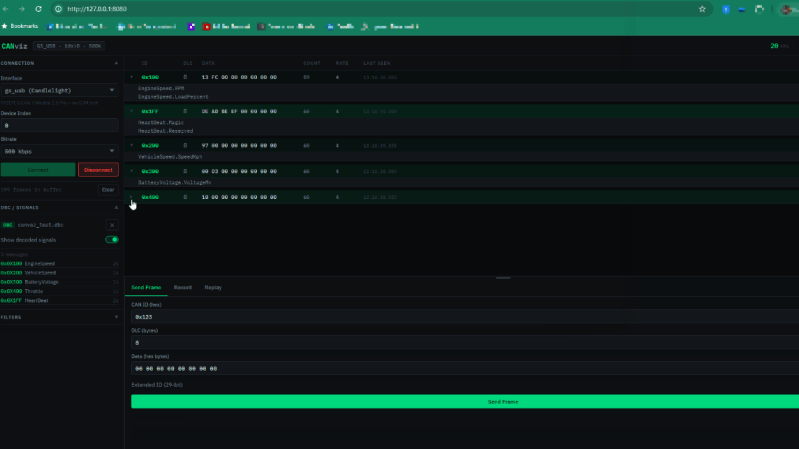
If you’ve got a modern car, truck, or tractor, it’s probably got a CAN bus or three that is bouncing data all around the vehicle. Listening in on these transmissions can enlighten you to what’s going on with sensors and modules which can aid in troubleshooting. You might find [Chanchal]’s latest work to be helpful in this regard — a CAN bus visualizer that runs right in your browser.
CANviz, as the project is known, is designed to work with any one of a number of cheap USB CAN reader modules. To use it, you simply run the Python “pip” tool to install it, and then you have a live CAN bus frame analyzer running on your local machine. Point your browser to localhost:8080 and you can see the data pouring in from whatever you happen to be hooked up to. The tool supports decoding CAN DBC files to make better sense of the raw data coming off the bus, and you can also record sessions for later analysis and even send CAN frames yourself if you need to. You can also run the tool on a remote single-board PC if so desired and access it over a network connection from another machine.
We’ve explored CAN hacking tools before and tools for visualization as well. Often, the latter is important when trying to debug and investigate dynamic issues. Meanwhile, if you’re working on your own automotive interface hacks, don’t hesitate to notify the tipsline!