
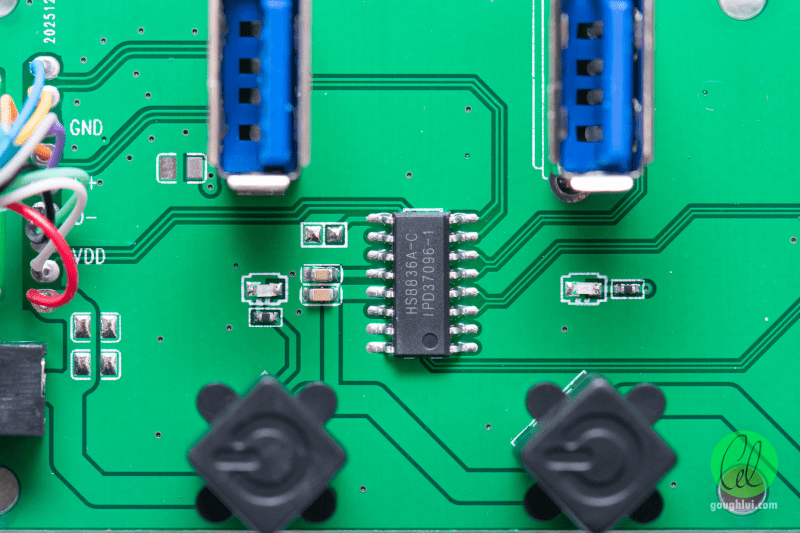
[Dr. Gough] bought a generic USB 3.0 hub on an Asian website. Surely, USB 3 is mature enough that even the cheapest hub will have some IC in it that will work well, right? You’d think so, but a little exploratory surgery showed that the only thing about this hub that was USB 3 were the blue port connectors.
We have a few problem USB hubs ourselves, so it might be worth doing this to any you have lying around. The first clue: most of the connectors on the PCB only have four pins. On closer examination, the hub appears to be a USB 3.0 extension cable with a USB 2.0 hub made from two HS8836A chips.
Not only are these USB 2-only, but all the ports on an HS8836A also share the same USB 1.1 bandwidth. Some hubs can provide multiple ports full 1.1 bandwidth, using the higher-speed USB protocol to the PC as a backhaul.
There were quite a few other issues. Missing solder, cables soldered to the board directly, and no bypass capacitors. The per-port switches cut off USB power, but that wouldn’t stop a device with its own power from connecting. The hub has a barrel jack for power, but it would feed back to the PC, which is bad practice at best.
If you use Linux, try
lsusb -t and look at the negotiated speed for your hubs. If they aren’t what you expect, it could be a cable issue, or it could just be that you also have a cheap USB hub. Don’t be surprised if your USB 3 hub shows both a USB 3 and a USB 2 hub; that’s common. But if you only see the USB 2 hub, something is amiss, or someone’s lying.You can learn a lot about USB 3 reading Hackaday.